
Learn how to reliably get JSON responses from LLMs using LangChain4j ChatModel Structured Output, enforce strict JSON schemas, and safely handle AI responses in production systems.
1. Introduction
Have you ever asked an AI model to generate JSON data but receives inconsistent formats, missing fields, or plain text wrapped in markdown code blocks? This is a common problem when working with Large Language Models (LLMs).
In our previous article, we explored the LangChain4j ChatModel interface and its various methods. Today, we are solving a recurring issue in AI development. As developers, we love JSON. It is structured, type-safe, and predictable. However, Large Language Models (LLMs) love to chat.
If you ask an AI for a list of products, it might give you a bulleted list, a paragraph, or it might wrap JSON inside Markdown code blocks (like “`json … “`). This inconsistency makes it impossible to build reliable applications.
In this guide, we will learn LangChain4j ChatModel Structured Output which will force the AI to return strict JSON data that matches our specific JSON schema, ensuring our application never crashes due to “creative” AI formatting.
2. The Problem: Why Do We Need Structured Output?
Imagine you are building an order processing system. You ask the AI: “Give me an order object”. When you ask an AI model to generate JSON, you might expect clean, parseable data. But reality often looks like this:
Scenario A (The Happy Path): The AI returns perfect JSON.
{
  "orderId": "12345",
  "totalAmount": 299.99,
  "items": [...]
}Scenario B (The Markdown Mess): The AI successfully returns JSON output, but it wraps the response inside Markdown code fences like this:
```json
{
  "orderId": "12345",
  "totalAmount": 299.99,
  "items": [...]
}
```Scenario C (The Hallucination): The AI returns JSON, but not in expected format
{
  "order_id": "12345",  // Note: inconsistent field naming
  "total": "299.99",     // String instead of number!
  "items": [...]
}Common Issues Without Structured Output:
- Inconsistent Field Names: orderId vs order_id vs OrderID
- Wrong Data Types: Strings instead of numbers, numbers instead of booleans
- Missing Required Fields: The model might omit critical data
- Extra Wrapper Text: Markdown code blocks, explanatory text before or after JSON
- Invalid JSON: Trailing commas, unescaped characters, malformed syntax
These inconsistencies can break your application, require extensive validation logic, and make production deployment risky.
LangChain4j ChatModel Structured Output solves all these problems by giving you complete control over the response format.
3. The Solution: LangChain4j ChatModel Structured Output
To solve this, LangChain4j provides different ways to request data. Let’s break down the four scenarios you will encounter.
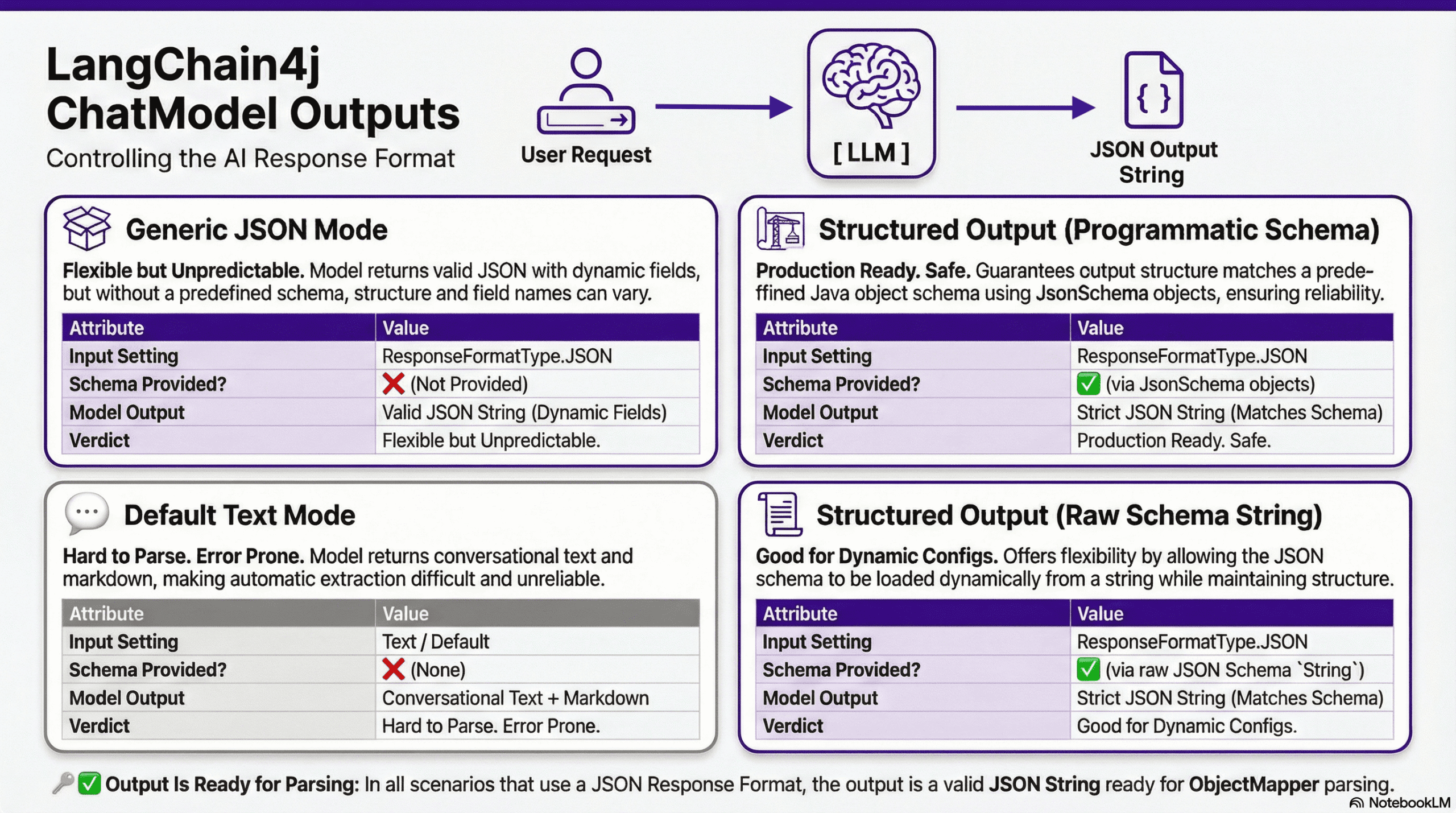
1. Default Text Mode (The “Wild West”)
- Behavior: You just send a prompt.
- Result: The AI returns text, markdown, or conversation.
- Risk: Extremely high. Hard to parse. Not recommended for data integration.
2. Generic JSON Mode (The “Flexible Box”)
- Behavior: You tell the model to use
ResponseFormatType.JSON. - Result: The AI guarantees the output will be valid JSON syntax (no trailing text, no markdown).
- The Catch: You did not provide a schema. The AI might return
{ "cost": 10 }one time and{ "price": 10 }the next. - Java Handling: Since the fields are unpredictable, you cannot safely map this to a specific Java Class. You should map this to a
Map<String, Object>.
3. Structured Output – Programmatic (The “Strict Contract”)
- Behavior: You provide a strict JSON Schema defined using Java code.
- Result: The AI follows your rules exactly. If you say price is an Integer, it will return an Integer.
- Java Handling: Safe to map directly to a strict Java POJO (e.g., OrderDetails). This is the production standard.
4. Structured Output – Raw String (The “External Config”)
- Behavior: Similar to Scenario 3, but instead of writing Java code to build the schema, you pass a raw JSON Schema string.
- Result: Strict, compliant JSON.
- Java Handling: Safe to map to a Java POJO (e.g., OrderDetails). This is also the production standard.
4. Building a Structured Output Laboratory
We are going to build a Structured Output Laboratory. This Spring Boot application will expose 4 distinct endpoints, each demonstrating a different strategy for extracting data from the ChatModel interface ranging from the “Wild West” of plain text to the strict enforcement of JSON schemas.
4.1. Project Structure Overview
Before diving into the code, let’s understand how our application is organized to handle schemas and data mapping:
langchain4j-chat-model-structured-output
├── src
│   └── main
│       ├── java
│       │   └── com
│       │       └── bootcamptoprod
│       │           ├── controller
│       │           │   └── OrderController.java          # Handles the 4 output scenarios
│       │           ├── dto
│       │           │   ├── OrderDetails.java             # The target Java Record (POJO)
│       │           │   ├── Address.java                  # Nested data structure
│       │           │   └── OrderItem.java                # List item structure
│       │           ├── service
│       │           │   └── SchemaBuilderService.java     # Defines the strict JSON Schema
│       │           └── Langchain4jChatModelStructuredOutputApplication.java
│       └── resources
│           └── application.yml                           # OpenRouter/Model configuration
└── pom.xml                                               # Dependency management
Structure Breakdown:
Here is what each component does in our application:
- SchemaBuilderService.java: This is the Architect of our application. It uses LangChain4j’s builder pattern to define the strict “Contract” (JSON Schema) that the AI model must follow. It ensures the AI knows exactly which fields are mandatory (e.g., orderId, totalAmount).
- OrderController.java: This is the Laboratory Workbench. It contains the 4 REST endpoints (
/text,/generic,/structured,/raw-schema) that allow us to test and compare how the AI behaves under different configurations. - OrderDetails.java (and DTOs): These are our Blueprints. We use Java Records to define the exact shape of the data we want. Once the AI returns valid JSON, the ObjectMapper uses these records to create type-safe Java objects.
- application.yml: The Command Center. We configure it to point to OpenRouter and select a model that supports the structured output / json_mode features we need.
- pom.xml: Manages our libraries, specifically importing the
langchain4j-open-ai-spring-boot-starterwhich provides the core ChatModel functionality.
4.2. Diving Into the Code
Let’s build this! We will create a Spring Boot app that generates sample e-commerce orders.
Step 1: Setting Up Maven Dependencies
First, let’s set up our Maven project with all necessary dependencies. The pom.xml file defines our project configuration and required libraries:
<properties>
	<java.version>21</java.version>
	<langchain4j.version>1.10.0</langchain4j.version>
</properties>

<dependencies>
	<!-- Spring Boot Web for REST endpoints -->
	<dependency>
		<groupId>org.springframework.boot</groupId>
		<artifactId>spring-boot-starter-web</artifactId>
	</dependency>
	<!-- LangChain4j OpenAI Spring Boot Starter -->
	<dependency>
		<groupId>dev.langchain4j</groupId>
		<artifactId>langchain4j-open-ai-spring-boot-starter</artifactId>
	</dependency>
</dependencies>

<dependencyManagement>
	<dependencies>
	  <!-- LangChain4j BOM for version management -->
		<dependency>
			<groupId>dev.langchain4j</groupId>
			<artifactId>langchain4j-bom</artifactId>
			<version>${langchain4j.version}</version>
			<type>pom</type>
			<scope>import</scope>
		</dependency>
	</dependencies>
</dependencyManagement>
What’s Important Here:
- langchain4j-open-ai-spring-boot-starter: This is the primary bridge between Spring Boot and the AI world. It handles the heavy lifting of integrating the framework and setting up the communication channels needed to talk to Large Language Models (LLMs) automatically.
- langchain4j-bom: This is the Bill of Materials. Think of it as a master version controller. It ensures that all LangChain4j-related libraries (like core and model providers) are perfectly compatible with each other, so you don’t have to worry about individual version numbers.
- spring-boot-starter-web: This dependency is what allows our application to function as a web service. It provides the necessary tools to create endpoints so our app can receive questions and send back answers.
Step 2: Configure Application Properties
Next, let’s configure our application settings in application.yml. Also, we will configure the AI model connection:
spring:
  application:
    name: langchain4j-chat-model-structured-output

langchain4j:
  open-ai:
    chat-model:
      base-url: https://openrouter.ai/api/v1                        # OpenRouter's API endpoint (compatible with OpenAI API format)
      api-key: ${OPENROUTER_API_KEY}                                # Get your free API key from https://openrouter.ai/
      model-name: mistralai/devstral-2512:free                      # Using free model via OpenRouter
      log-requests: true                                            # Enable logging to see requests
      log-responses: true                                           # Enable logging to see responses
📄 Configuration Overview
- spring.application.name: Simply gives our application a name for identification within the Spring ecosystem.
- langchain4j:
- open-ai.chat-model: This section configures the “Chat” capabilities of our AI.
- api-key: This is your “password” for the AI service. It allows the application to securely authenticate with the model provider.
- base-url: Tells our application where to send the requests. Since we are using OpenRouter, we point it to their specific API address.
- model-name: Specifies exactly which “brain” we want to use – in this case, the model provided by OpenRouter.
- log-requests: When set to true, this shows the exact message we send to the AI in our console, which is very helpful for learning and debugging.
- log-responses: This displays the full response we get back from the AI in the console, allowing us to see the metadata and the raw text response.
- open-ai.chat-model: This section configures the “Chat” capabilities of our AI.
💡 Pro Tip: OpenRouter provides a “Supported Parameters” filter where you can select structured_outputs to find all models supporting JSON mode. This is incredibly useful when choosing models!
💡 Note: Since LangChain4j uses a standardized protocol, switching from OpenRouter to actual OpenAI models is incredibly easy. Simply update these values in your application.yml:
langchain4j:
  open-ai:
    chat-model:
      base-url: https://api.openai.com/v1
      api-key: ${OPENAI_API_KEY}
      model-name: gpt-4o # (or your preferred OpenAI model)
Step 3: Application Entry Point
This is the main class that bootstraps our entire application.
package com.bootcamptoprod;

import org.springframework.boot.SpringApplication;
import org.springframework.boot.autoconfigure.SpringBootApplication;

@SpringBootApplication
public class Langchain4jChatModelStructuredOutputApplication {

    public static void main(String[] args) {
        SpringApplication.run(Langchain4jChatModelStructuredOutputApplication.class, args);
    }

}
Explanation:
- This is the standard Spring Boot application entry point. The
@SpringBootApplicationannotation enables auto-configuration, component scanning, and configuration properties. LangChain4j’s Spring Boot starter automatically configures theChatModelbean based on ourapplication.ymlsettings.
Step 4: Defining Your Data Models
We’re building an e-commerce order system. These are the Java Records that represent the data we want the AI to generate.
// 1. The main Order Object
public record OrderDetails(
        String orderId,
        Double totalAmount,
        Boolean isGiftWrapped,
        Address shippingAddress,       // Nested Object
        List<OrderItem> orderItems,    // List of Objects
        List<String> appliedCoupons    // List of Strings
) {}

// 2. Nested Address
public record Address(
    String street,
    String city,
    Integer zipCode
) {}

// 3. Nested Item
public record OrderItem(
    String productName,
    Integer quantity,
    Double price
) {}Step 5: Building JSON Schemas: The SchemaBuilderService
This service creates JSON schemas in two ways: programmatically using LangChain4j’s builders, and from raw JSON strings.
package com.bootcamptoprod.service;

import dev.langchain4j.model.chat.request.json.JsonArraySchema;
import dev.langchain4j.model.chat.request.json.JsonBooleanSchema;
import dev.langchain4j.model.chat.request.json.JsonIntegerSchema;
import dev.langchain4j.model.chat.request.json.JsonNumberSchema;
import dev.langchain4j.model.chat.request.json.JsonObjectSchema;
import dev.langchain4j.model.chat.request.json.JsonSchema;
import dev.langchain4j.model.chat.request.json.JsonStringSchema;
import org.springframework.stereotype.Service;

@Service
public class SchemaBuilderService {

    public JsonSchema getOrderSchema() {
        return JsonSchema.builder()
                .name("OrderDetails")
                .rootElement(JsonObjectSchema.builder()
                        // 1. Basic Types
                        .addProperty("orderId", JsonStringSchema.builder().description("Unique order identifier").build())
                        .addProperty("totalAmount", JsonNumberSchema.builder().description("Total cost of the order").build())
                        .addProperty("isGiftWrapped", JsonBooleanSchema.builder().description("If the user requested gift wrapping").build())

                        // 2. Nested Object: Shipping Address
                        .addProperty("shippingAddress", JsonObjectSchema.builder()
                                .addProperty("street", JsonStringSchema.builder().build())
                                .addProperty("city", JsonStringSchema.builder().build())
                                .addProperty("zipCode", JsonIntegerSchema.builder().build())
                                .required("street", "city", "zipCode")
                                .build())

                        // 3. Array of Objects: Order Items
                        .addProperty("orderItems", JsonArraySchema.builder()
                                .items(JsonObjectSchema.builder()
                                        .addProperty("productName", JsonStringSchema.builder().build())
                                        .addProperty("quantity", JsonIntegerSchema.builder().build())
                                        .addProperty("price", JsonNumberSchema.builder().build())
                                        .required("productName", "quantity", "price")
                                        .build())
                                .build())

                        // 4. Array of Strings: Coupons
                        .addProperty("appliedCoupons", JsonArraySchema.builder()
                                .items(JsonStringSchema.builder().description("Coupon code").build())
                                .build())

                        // Define mandatory root fields
                        .required("orderId", "totalAmount", "isGiftWrapped", "shippingAddress", "orderItems", "appliedCoupons")
                        .build())
                .build();
    }

    public String getRawSchemaString() {
        return """
                {
                  "type": "object",
                  "properties": {
                    "orderId": { "type": "string" },
                    "totalAmount": { "type": "number" },
                    "isGiftWrapped": { "type": "boolean" },
                    "shippingAddress": {
                      "type": "object",
                      "properties": {
                        "street": { "type": "string" },
                        "city": { "type": "string" },
                        "zipCode": { "type": "integer" }
                      },
                      "required": ["street", "city", "zipCode"],
                      "additionalProperties": false
                    },
                    "orderItems": {
                      "type": "array",
                      "items": {
                        "type": "object",
                        "properties": {
                          "productName": { "type": "string" },
                          "quantity": { "type": "integer" },
                          "price": { "type": "number" }
                        },
                        "required": ["productName", "quantity", "price"],
                        "additionalProperties": false
                      }
                    },
                    "appliedCoupons": {
                      "type": "array",
                      "items": { "type": "string" }
                    }
                  },
                  "required": ["orderId", "totalAmount", "isGiftWrapped", "shippingAddress", "orderItems", "appliedCoupons"],
                  "additionalProperties": false
                }
                """;
    }
}
Explanation:
- This service builds a “contract.”
- getOrderSchema(): Uses LangChain4j’s fluent builder API for type-safe schema creation
- JsonObjectSchema: Represents a standard object {}.
- .addProperty(…): Defines fields like orderId (String) or totalAmount (Number).
- .required(…): This is crucial. It tells the AI, “You CANNOT omit these fields.”
- getRawSchemaString(): Returns standard JSON Schema (Draft 2020-12 format) as a string
- Both methods create identical schemas, just using different approaches
- Nested objects and arrays are fully supported. Notice how
shippingAddressis an Object Schema inside the main Object Schema.
Step 6: Implementation: The 4 Output Scenarios
Now for the main event! Our controller demonstrates four different ways to work with structured output.
Scenario 1: Models Without JSON Support
Use Case: Showing what happens when you don’t use Structured Output.
@GetMapping("/text")
public String getTextOrder() {

    UserMessage userMessage = UserMessage.from("Generate a sample order receipt in JSON format.");

    ChatRequest request = ChatRequest.builder()
            .messages(userMessage)
            .responseFormat(ResponseFormat.builder()
                    .type(ResponseFormatType.TEXT) //default
                    .build())
            .build();

    ChatResponse response = chatModel.chat(request);

    // Returns the raw markdown string (e.g., ```json { ... } ```)
    return response.aiMessage().text();
}
What’s happening?
- The output here is unpredictable. We request JSON, but the model might not support it
- Response could be wrapped in markdown: “`json … “`
- Requires additional string processing on your end
Scenario 2: Generic JSON (No Schema)
Use Case: You want the response to be valid JSON, but you don’t care about the specific field names, or the structure is dynamic.
@GetMapping("/generic")
public Map<String, Object> getGenericOrder() throws JsonProcessingException {
    UserMessage userMessage = UserMessage.from("Generate a fake e-commerce order receipt");

    ChatRequest request = ChatRequest.builder()
            .messages(userMessage)
            // We ask for JSON, but we don't define strictly what fields must be there.
            .responseFormat(ResponseFormat.builder().type(ResponseFormatType.JSON).build())
            .build();

    ChatResponse response = chatModel.chat(request);

    // Convert LLM String -> Java Map so Spring renders it as real JSON
    return objectMapper.readValue(response.aiMessage().text(), new TypeReference<>() {
    });
}What’s happening?
- We ask for JSON output via
ResponseFormatType.JSON - No schema is specified – the model decides the structure
- Response is parsed into a generic
Map<String, Object> - Perfect for exploration or when you don’t have a fixed structure yet
Scenario 3: Structured Output with Schema (Recommended)
Use Case: This is the recommended approach for production. You enforce the schema we built earlier.
@GetMapping("/structured")
public OrderDetails getStructuredOrder() throws JsonProcessingException {

    UserMessage userMessage = UserMessage.from("Create a complex order with 2 items (Laptop, Mouse) and a shipping address in NY.");

    ChatRequest request = ChatRequest.builder()
            .messages(userMessage)
            // We pass the strict Schema here
            .responseFormat(ResponseFormat.builder()
                    .type(ResponseFormatType.JSON)
                    .jsonSchema(schemaBuilder.getOrderSchema())
                    .build())
            .build();

    ChatResponse response = chatModel.chat(request);

    // Map to our OrderDetails Record
    return objectMapper.readValue(response.aiMessage().text(), OrderDetails.class);
}
What’s happening?
- We pass our strict
JsonSchemavia.jsonSchema(JsonSchema Obj) - The model must follow this exact structure
- Response is mapped directly to our
OrderDetailsPOJO - Type safety guaranteed – no surprises!
Scenario 4: Raw JSON Schema String
Use Case: You already have a JSON Schema (e.g., from a frontend team or saved in a DB) and want to use it without writing Java Builders.
@GetMapping("/raw-schema")
public OrderDetails getOrderByRawSchema() throws JsonProcessingException {

    UserMessage userMessage = UserMessage.from("Generate a fast shipping order for a 'Mechanical Keyboard' (Qty: 2, Price: 120.0).");

    // 1. Raw JSON Schema as a String from our SchemaBuilderService
    String rawSchemaString = schemaBuilder.getRawSchemaString();

    // 2. Create JsonSchema from the raw string
    JsonRawSchema jsonRawSchema = JsonRawSchema.from(rawSchemaString);
    JsonSchema jsonSchema = JsonSchema.builder()
            .name("OrderDetails")
            .rootElement(jsonRawSchema).build();

    // 3. Build the Request with this Schema
    ChatRequest request = ChatRequest.builder()
            .messages(userMessage)
            .responseFormat(ResponseFormat.builder()
                    .type(ResponseFormatType.JSON)
                    .jsonSchema(jsonSchema)
                    .build())
            .build();

    ChatResponse response = chatModel.chat(request);

    // 4. Map the result to our Java Record
    return objectMapper.readValue(response.aiMessage().text(), OrderDetails.class);
}What’s happening?
- Schema comes as a string (from file, database, API, etc.)
- We create
JsonRawSchemafrom the string - Wrap it in a
JsonSchemaobject - Same strict validation as Scenario 3!
5. Testing the Application
- Get an API Key: Go to OpenRouter and generate a free API key.
- Run the App: Set
OPENROUTER_API_KEYenvironment variable and run the Spring Boot app. - Send a Request: Use Postman or cURL:
5.1. Text Response:
curl http://localhost:8080/api/order/text
5.2. Generic JSON:
curl http://localhost:8080/api/order/generic
5.3. Structured Output:
curl http://localhost:8080/api/order/structured
5.4. Raw Schema:
curl http://localhost:8080/api/order/raw-schema
Output:
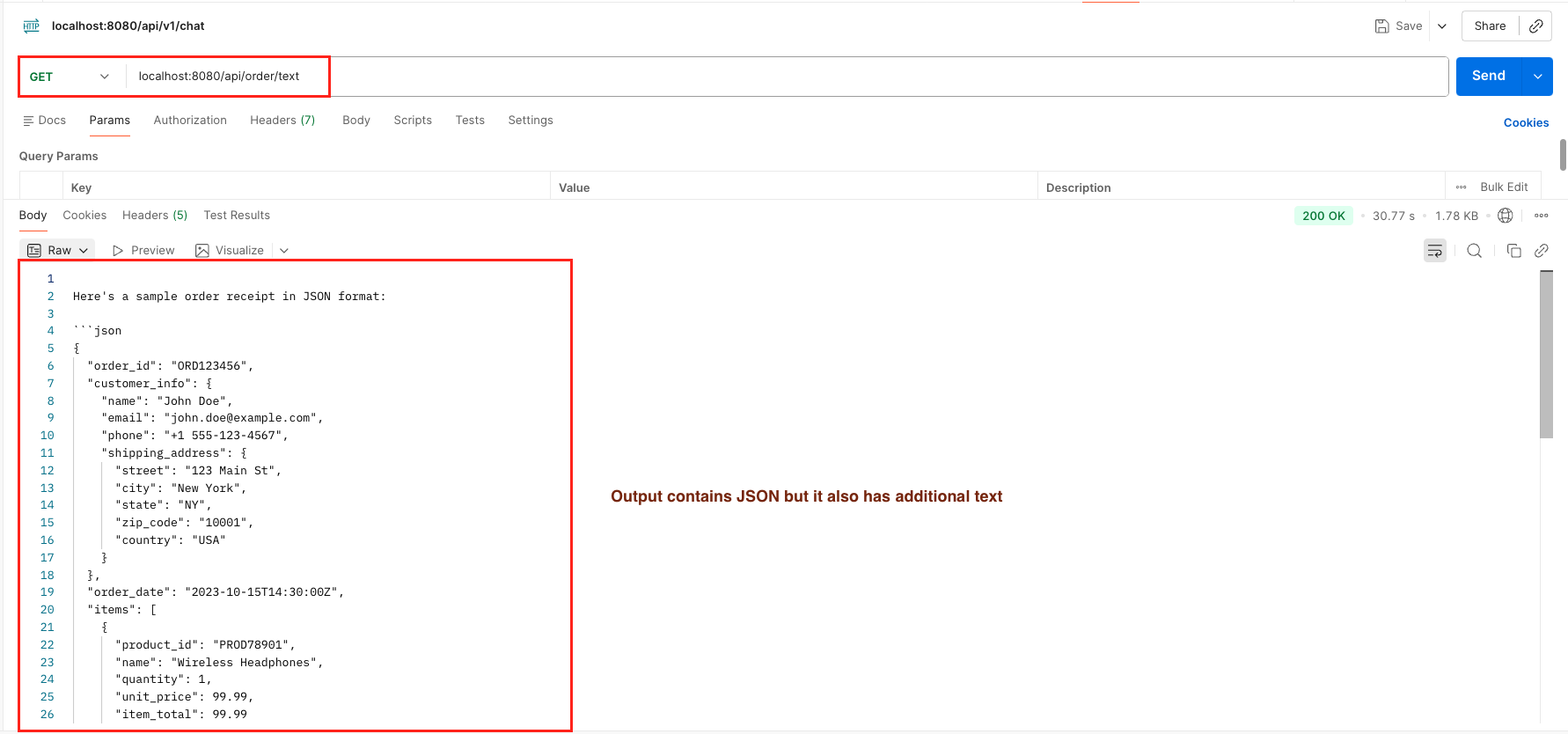 1. Output Without Native JSON Support – LangChain4j Structured Output
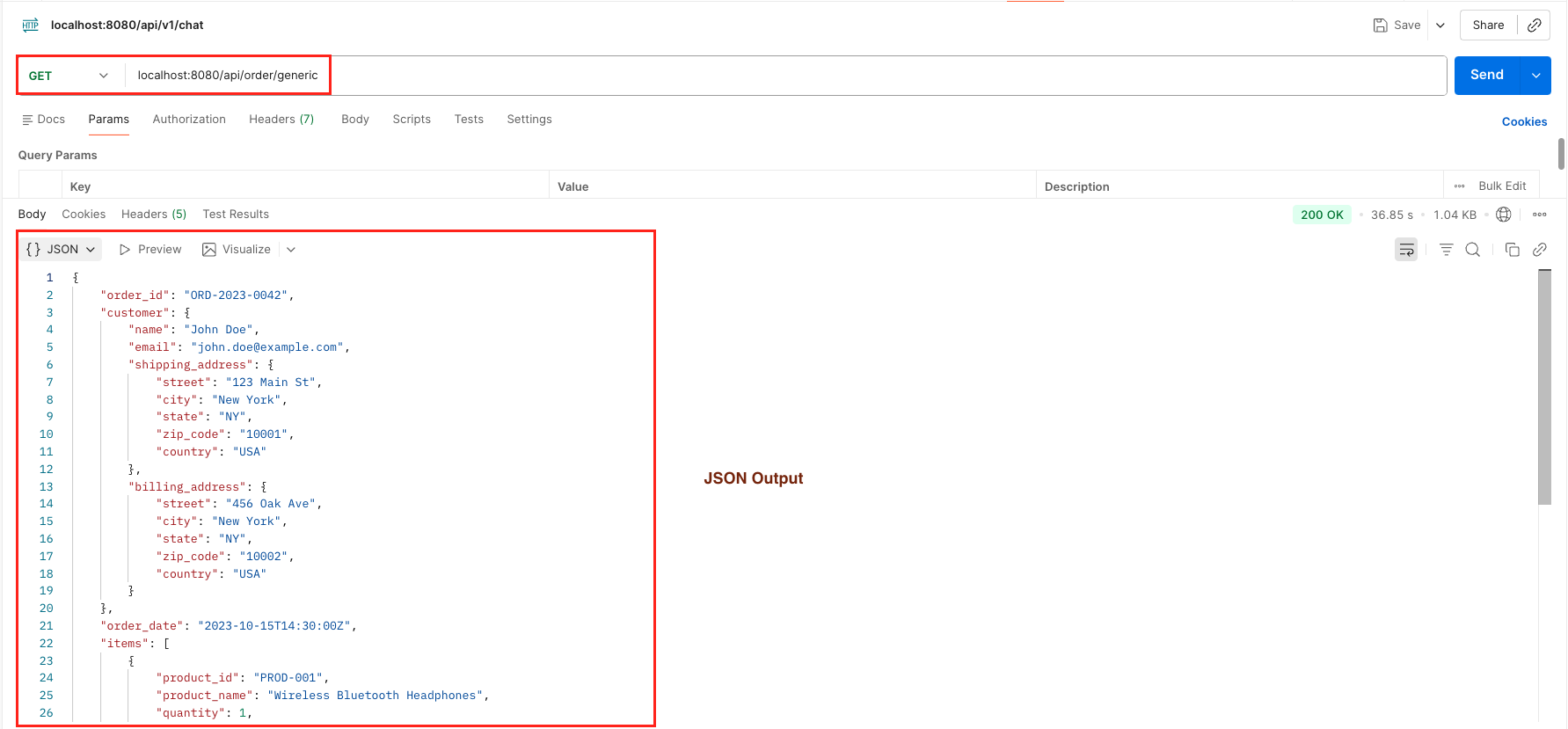 2. Generic JSON Output Without User Defined Schema – LangChain4j Structured Output
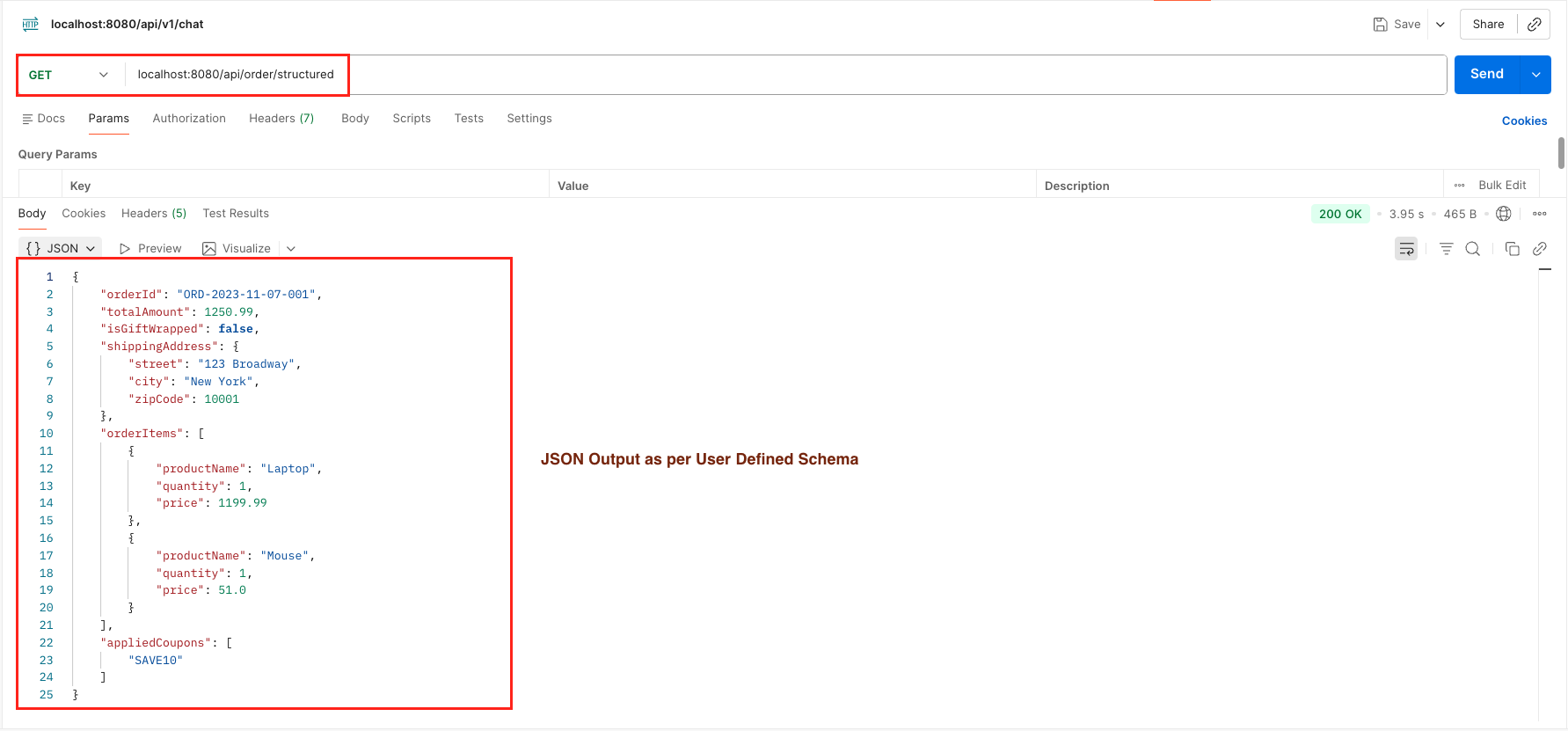 3. JSON Output With User Defined Schema – LangChain4j Structured Output
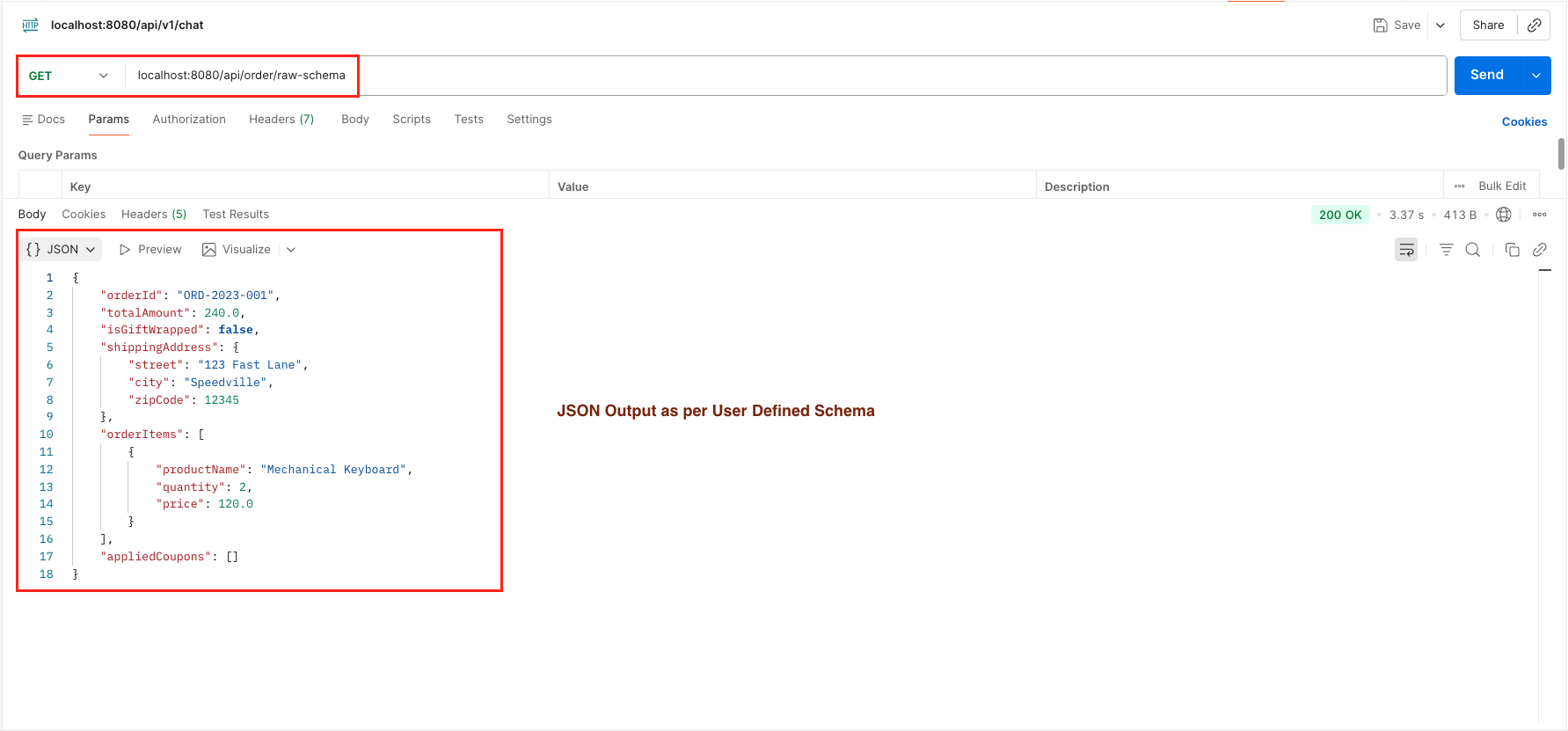 4. JSON Output With User Defined Schema in Raw Format – LangChain4j Structured Output
6. Video Tutorial
For a complete step-by-step walkthrough, check out our video tutorial where we build the LangChain4j ChatModel Structured Output app from scratch. We demonstrate all 4 distinct output scenarios, covering everything from handling generic JSON to enforcing strict programmatic schemas and parsing them into Java objects!
📺 Watch on YouTube:
7. Source Code
The full source code for our LangChain4j ChatModel Structured Output project is available on GitHub. Clone the repo, set your OPENROUTER_API_KEY as an environment variable, and launch the Spring Boot application to test all 4 output scenarios yourself!
🔗 LangChain4j ChatModel Structured Output: https://github.com/BootcampToProd/langchain4j-chat-model-structured-output
8. Things to Consider
While obtaining structured JSON from ChatModel transforms how we integrate AI, there are specific architectural and operational details you must handle for production reliability.
- Model Compatibility: Not all LLMs support ResponseFormatType.JSON or Structured Outputs. If you use an unsupported model, the responseFormat parameter might be ignored, resulting in plain text output. Always verify if your chosen model explicitly supports JSON Mode or Structured Outputs.
- Schema Token Overhead: When you pass a JsonSchema (as in Scenarios 3 & 4), the entire schema definition is sent to the LLM as part of the system context. Complex schemas with deep nesting and lengthy descriptions increase your Input Token usage. Keep schemas concise to save money and preserve context window space.
- The “Generic JSON” Risk: Using ResponseFormatType.JSON without a schema (Scenario 2) guarantees valid JSON syntax (no missing brackets), but it does not guarantee specific field names. The AI might return cost instead of price. Only use Generic Mode for dynamic data exploration; for core business logic, always enforce a strict schema.
- Low-Level vs. High-Level: In this tutorial, we manually parsed JSON using ObjectMapper to understand the underlying mechanics. However, LangChain4j offers a higher-level abstraction called AiService. It handles schema generation, request mapping, and response parsing automatically. We will cover this powerful feature in our future blog post.
- Exception Handling: Parsing AI responses can still fail. Always wrap your parsing logic in try-catch blocks to handle these edge cases gracefully.
9. FAQs
What is structured output in LangChain4j?
Structured output is the ability to enforce a JSON schema on AI model responses, ensuring you always receive data in a predictable format that maps to your Java objects. Instead of getting unpredictable JSON with varying field names and types, you define exactly what structure you want and the AI must comply.
Can I use this with Gson instead of Jackson?
Yes! The ChatModel returns a String. You can use any JSON library (Gson, Jackson) to parse that string into your Java object.
Why is my model returning markdown JSON even though I enabled JSON mode?
This usually happens if the model you are using does not natively support Structured Outputs. While models like GPT-5.2 and Mistral respect the ResponseFormatType.JSON flag strictlty, older or smaller models might ignore it. If using OpenRouter, try filtering for models tagged with “Structured Outputs”.
Can I load the Schema from a file instead of writing Java Builders?
Yes, you can read a JSON Schema file (e.g., order-schema.json) from your src/main/resources folder into a String and pass it to JsonRawSchema.from(string). This is great for keeping your Java code clean and separating configuration from logic.
I defined the schema, but the AI is filling fields with the wrong data. Why?
The Schema defines the type (e.g., String), but the Description defines the meaning. If you have a field called data, the AI might guess what to put there. Ensure you use .description(“The date of purchase in YYYY-MM-DD format”) in your builder. The AI reads these descriptions as instructions on how to fill the field.
Can I request a List of Objects directly (e.g., [{}, {}]) instead of a wrapper Object?
Yes! While wrapping data in a root object is good for extensibility, you can generate a raw JSON array at the root level. To do this, simply use JsonArraySchema.builder().items() as your root element instead of JsonObjectSchema. This tells the model that the top-level output must be a list, allowing you to map the response to a List<OrderItem> or OrderItem[] in Java.
10. Conclusion
Structured output transforms AI integration from unpredictable conversation into production ready reliability. By enforcing strict JSON schemas within your application, you effectively bridge the gap between the creative nature of LLMs and the rigid requirements of business logic. This approach not only eliminates common parsing errors but also ensures data integrity, allowing you to build confident, type-safe AI features that behave like deterministic software components rather than random text generators.
11. Learn More
Interested in learning more?
LangChain4j ChatModel: A Complete Beginner’s Guide
Add a Comment